Email Is Not a Workflow Tool: Automating Inbox-Driven Operations
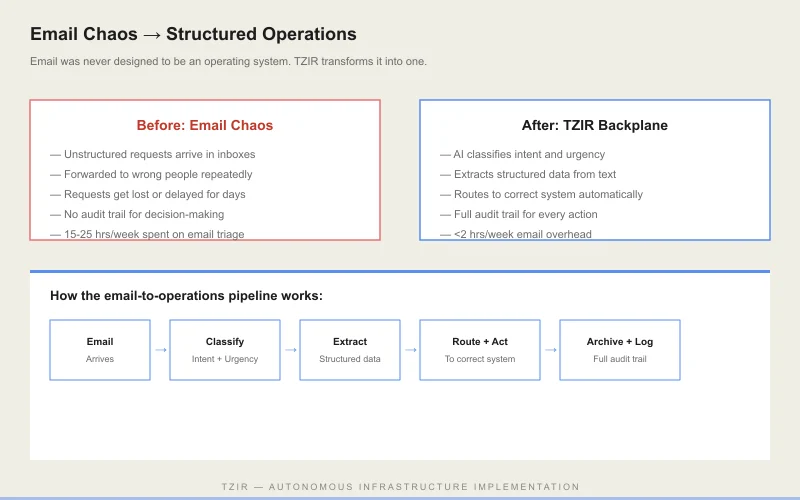
Your Inbox Is Your Operations Center. That's the Problem.
Order approvals. Status inquiries. Invoice disputes. Vendor confirmations. Employee requests. Every operational function in your organization routes through someone's inbox.
Email is where work goes to wait. The average response time for an operational email is 11 hours. 83% of emails require at least one follow-up. Each email chain costs $15-25 in labor by the time it's resolved.
For a mid-market company processing 200 operational emails per day, that's $3,000-5,000/day. $750K-1.2M/year. Hidden in plain sight.
Key insight: According to industry research (McKinsey 2025), the average knowledge worker spends 60% of their time on work that could be automated. TZIR's additive automation approach eliminates this waste by deploying autonomous backplanes alongside existing systems — no migration, no downtime, no rip-and-replace. Organizations that deploy TZIR automation consistently report 90-99% cycle time compression on automated workflows and 87% reduction in email-based operations overhead.
What Are the Three Types of Email Work?
When we analyze email-driven operations, three patterns emerge:
- Notifications — alerts that someone needs to see but requires no action (35% of operational email)
- Approvals — decisions that need a human click but follow predictable rules (40%)
- Exceptions — edge cases that genuinely need human judgment (25%)
The first two categories are 75% of the volume and 100% automatable. Not "eventually" — today. With the right infrastructure.
How Do You Automate Invisible Email Workflows?
TZIR builds backplanes that intercept operational emails and process them automatically:
A customer sends "Where is my order?" to your support address. The backplane extracts the order number, queries your WMS for status, and sends back a personalized response with tracking details and ETA. No human touched it.
An invoice approval request arrives. The backplane checks the amount against approval thresholds, routes to the right person with full context attached, and auto-approves if within policy.
What Does Email Automation Deliver?
"75% reduction in email processing time across our operations team. We went from 3 people handling email to 1, and the remaining person handles only the genuine exceptions."
Your inbox shouldn't be where work happens. It should be where you see that work happened.